Attorney Ratings and Reviews

When people need legal help, they rely on peer feedback — FindLaw.com connects those seekers with the proof they need while giving legal professionals a platform to showcase their standing, strengthen their identity, and rise above the competition.


Building Trust In Law Firms Through Authentic Client Reviews

Consumers trust ratings and reviews to guide their decisions, and FindLaw.com helps them find those insights while giving law firms and attorneys a way to highlight their reputation, build their brand and stand apart from others.

How FindLaw Reviews Work

It's easy to participate in FindLaw Ratings and Reviews.

FOR CLIENTS

Leave a Review

Share Your Legal Experience

Locate the FindLaw.com profile for the attorney and/or the law firm you were a client of. Click 'Write a Review' and complete a star rating and a written review of your experience.

Verify Review for Authenticity

After you submit your review, you will receive an email to verify your identity. To move your review to the next step, click the verification button in the email.

Publish Your Review on FindLaw.com

Your review will move to a 'holding tank' where the attorney can evaluate it. The review will publish automatically after 14 days if the attorney takes no action.

FOR ATTORNEYS

Publish a Review

Review Content and Verify the Client

FindLaw emails the attorney or law firm when a review has been submitted. They log into the FindLaw Profile Update system to read the review and verify the reviewer was a client.

Reply to the Reviewer

A best practice is to create an official reply to the review that will be posted on FindLaw.com. The reply can include responding to a negative review or simply thanking the reviewer for their business.

Publish the Review

The attorney can publish their reply, which will appear alongside the published review.

14-Day Attorney Review Period

After you verify your email, your review will be subject to a 14-day attorney review period before it's published on FindLaw.com. This ensures fairness and accuracy for all parties.

Reporting Reviews

An attorney cannot reject a review. Reviews can only be stopped from publishing or removed if they include inappropriate or vulgar content, spam, or represent another business.

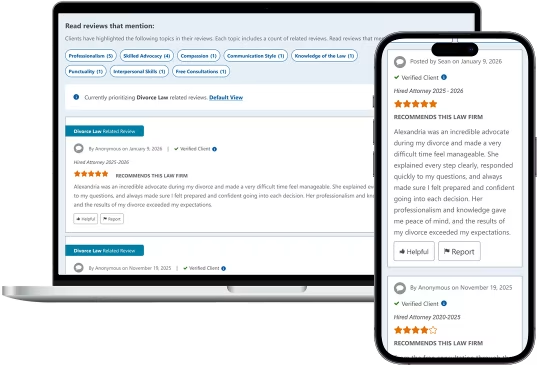
See Attorney Reviews & Ratings in Action

Explore how FindLaw's verified review system helps attorneys build credibility and helps clients make informed decisions.

Why Trust FindLaw Reviews?

  • Verified Relationships

    We confirm you actually worked with the attorney before your review is published.

  • No Fake Reviews

    Strict spam detection filters out inauthentic content and protects attorney reputations.

  • 14-Day Verification Process

    Every review undergoes thorough verification before appearing on attorney profiles.

Screenshots of verified attorney reviews on desktop and mobile

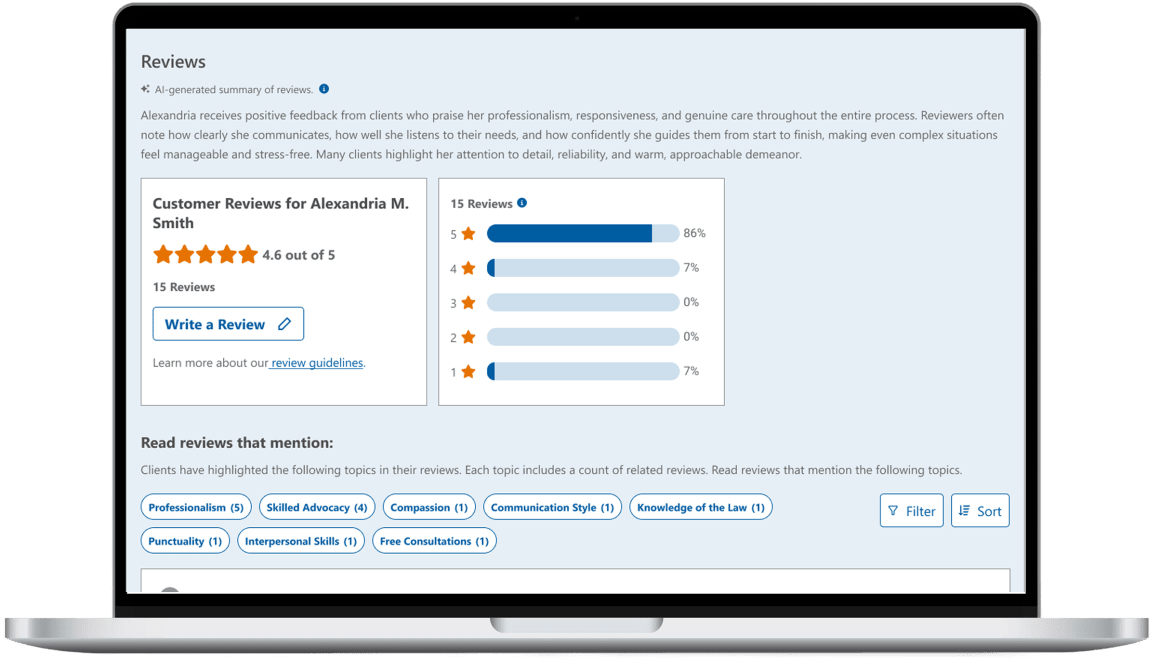
Complete Performance Insights

Understand attorney strengths at a glance with comprehensive ratings, filtering options, and AI-powered review highlights.

FindLaw profile Reviews section with an AI-generated review summary, a 4.6 out of 5 rating breakdown and review theme filters

Star ratings: Star ratings and review counts help you gauge past client experiences.

Filtering options: Legal practice area filtering focuses on your specific legal situation.

AI summary: We structure your firm’s information so search engines and AI platforms can clearly understand and trust it. Firms are more likely to be surfaced, cited, and recommended instead of overlooked.

Quickly access the key information that applies to you and your legal situation. This makes it easier to compare your options and choose the right attorney.

Profile Trust Indicators

Attorney profiles display multiple trust signals to help potential clients make confident decisions. These visual indicators showcase rating quality, review recency, and practice area expertise.

4.6 out of 5

Overall Rating

Star rating with numerical score provides instant credibility assessment visible at the top of every attorney profile.

Recently Reviewed

Review Recency

Reviews on a profile are sorted by recency as a primary factor after a featured review is displayed.

Divorce Law Related Review

Areas of Practice Reviews

Reviews are organized by legal practice area to help find an attorney with relevant experience for a specific legal situation.

Profile Impact Example

Consumers are looking for validation. They can become skeptical if they don’t see any reviews on a profile. See the difference having reviews can make.

BEFORE: Profile Without Reviews

Example of a FindLaw profile before it has received reviews

AFTER: Profile With Verified Reviews

Example of a FindLaw profile with verified reviews

5 Steps for an Attorney to Get More Reviews:

  1. Request reviews through the “Request” tab of Ratings & Reviews Admin (this feature is for paid profile owners only).
  2. Add text within your email signature that says, “Review Us”, and hyperlink that text to your attorney or firm profile on FindLaw.com.
  3. Build reviews into your exit process, such as by making leaving a review part of the conversation in a wrap-up email, meeting, or phone call.
  4. Add a mention of reviews on your on-hold message or voicemail.
  5. Add a review funnel to your website.

Frequently Asked Questions

Review the questions and answers below to learn more.

Overall star ratings appear on FindLaw.com profiles. For law firms, the star rating is an average of all the ratings submitted for the law firm and any attorney affiliated with the law firm profile. Optional attorney ratings do not influence the overall rating of the firm or attorney.

The three optional FindLaw rating categories are defined as follows:

  • Value: How well the legal fees that were charged aligned with the services that were delivered.
  • Quality of Service: The customer experience, often defined by timeliness, conscientiousness, diligence, efficiency, or civility.
  • Professional Competence: The attorney's knowledge in their field and ability to adequately represent your needs.

The owner of the profile has verified that the author of the review is a past or present client.

FindLaw tags and categorizes all published reviews, where possible, based on a list of common themes which enable easy filtering and quick user access to relevant reviews.

FindLaw categorizes all published reviews, where possible, based on the legal practice area addressed by the reviewer. This information helps users sort and read the reviews most closely related to their legal matter quickly and easily.

The Recommendation flag means the review was collected through FindLaw's Recommendation service, which is now retired. Overall rating and optional ratings were not provided by FindLaw’s Recommendation service so are not displayed.

Marking a FindLaw review as "Helpful" by clicking the thumbs up icon gives the review a vote of confidence so other consumers can easily scan an attorney or law firm’s reviews and see which ones were most useful to other people.

It is left up to the attorney or law firm whether the Ratings & Reviews feature is displayed on their profile(s) or not. Attorneys and law firms cannot select particular reviews to include or exclude from displaying on their profile.

Some law firms and attorneys have profiles with features that enable them to show and aggregate reviews from Internet Brands’ other legal properties. FindLaw is a division of Internet Brands.

Not necessarily. An attorney or firm may have decided to opt out of the Ratings & Reviews services for their own personal reasons or may have not yet received engagement from previous clients for various reasons. Lack of Ratings & Reviews on a firm or attorney profile is not a definitive sign that they are unqualified or unfit to handle your legal needs.

No, any attorney or firm with a profile on FindLaw.com can participate in FindLaw’s Ratings & Reviews.

You can leave one review per attorney and one review per law firm. For example, if you worked with John Smith at Smith & Associates, you could leave one review for John Smith and one review for Smith & Associates.

Yes, if you have worked with multiple attorneys and multiple law firms in the past, you are welcome to leave one review per attorney and one review per law firm for each separate legal situation.

In order to protect your privacy, you can choose to either have your review be anonymous or else we will display your first name and the initial of your last name (e.g., "Chris N."). We will not use your entire name as the author of your review.

Your email address will be used for personal identification only. An email will be sent to you to verify your review. Email addresses will be shared with the attorney or law firm for verification purposes only.

You are required to include your name when submitting a review. This helps the law firm determine if the review is from an actual client of theirs. When the review is published, you can choose to have the reviewer name be anonymous or to include your first name and last initial.

“Service Start Year” is the year that you first engaged with the attorney or law firm. “Service End Year” is the year that you concluded your engagement with the attorney or law firm.

You can make your best estimate. This information is not publicly presented anywhere and is simply shared with the attorney or law firm so they can verify that you were a past client or engaged with them in some way.

When writing a review, be sure to mention the legal issue you needed help with, the case outcome (if possible), and the lawyer's professionalism and timeliness. Don’t share personal or sensitive information, such as your phone number or social security number. Don’t use profanity. Share your honest experience in an objective way. Use facts to support your experience (e.g. the attorney returned my calls within one business day).

To ensure the reviews left on FindLaw.com are useful and valid, all reviews are subject to an attorney review period before publishing. During this time, attorneys have 14 days to verify that the review was left by someone they have worked with either in a consultation or as a client. Attorneys can stop a review from being published if the review includes inappropriate or vulgar content, contains spam, or represents another business.

Be sure to check your spam folder. If you still can’t locate your verification email, please contact FindLaw Support.

No, you are not able to edit your review after it is submitted. However, you can delete your original review and submit a new review. There is a link to delete your original review in the email you receive to verify your email address. If you are not able to locate the email, contact FindLaw Support and they will provide you with a link to delete your original review.

Yes, you can delete your original review. There is a link to delete your original review in the email you receive to verify your email address. If you are not able to locate that email, contact FindLaw Support and they will provide you with a link to delete your original review.

It is possible that your review was reported by another party. If your review was reported and deemed to be unacceptable, then it was removed by FindLaw Support. For additional questions related to this scenario, please contact FindLaw Support.

To ensure the reviews left on FindLaw are useful and valid, all reviews are subject to an attorney review period before publishing. During this time, attorneys have 14 days to verify that the review was left by someone they have worked with either in a consultation or as a client. Attorneys are not able to stop a review from being published unless the review includes inappropriate or vulgar content, contains spam, or represents another business.

An attorney or law firm can report a review that violates the Terms of Service by clicking on the Report button. A review will not be removed solely because it is negative. The FindLaw Review Team will evaluate the request and make a decision to either keep the review or remove it, based on the FindLaw Terms of Service.

The FindLaw Review Team uses the FindLaw Terms of Service to guide decisions about reported reviews. Reviews that include profanity, spam, or references to unrelated businesses will be removed.

There is a "Report" button with a flag icon, located directly under the review content.

When you report a review, a member of the FindLaw Support team will assess the content of the review. If it is deemed as inappropriate content, spam, or related to another business, FindLaw Support will remove the review from the profile. If the review does not meet the appropriate criteria for removal, it will remain live on the profile. FindLaw Support will email you with the final decision.

Yes, sorting options include Most Recent, Highest Rated or Lowest Rated. The ability to filter by practice area is another option.

By default, reviews are sorted in this order:

  1. Featured review (selected by attorney)
  2. Verified clients (most recent to oldest)
  3. Neither verified nor unverified (most recent to oldest)
  4. Unverified clients (most recent to oldest)

Yes, the firm can respond to the review through FindLaw.com Ratings and Reviews system. The firm’s response will appear online and be attached to the review. Studies show that consumers want companies to respond to reviews in a professional manner. This adds authenticity to the law firm.

Yes, a firm or attorney can opt out of FindLaw.com reviews entirely. This could potentially put the firm at a disadvantage compared to other firms who choose to show reviews.

The FindLaw system requires a reviewer to verify their email address, and the 14-day review allows the firm or attorney to challenge a review prior to the review going live. It’s up to the firm or attorney to dispute whether the review was submitted by an actual client or not.

  • Spam filtering at submission: The review form includes a spam filtering mechanism that scans for inappropriate or vulgar content and spam. If a consumer attempts to submit a review containing vulgarity, inappropriate content, or spam, they will be prevented from submitting it.
  • Email verification prior to publishing: After leaving a review, the reviewer receives an email to verify their email address. If they do not verify their email address, the review will not be published.
  • Reporting and human review: If spam or inappropriate content is not caught by the filter, attorneys or consumers can report a review at any time. FindLaw Support assesses the review and the reporting reason; if the review does not meet the FindLaw Terms of Service, FindLaw Support will remove it. Otherwise, it will remain live on the site.

To help prevent fraudulent reviews, FindLaw requires the reviewer to enter their email address along with their review. Then, FindLaw sends an email to the address and requires the reviewer to click on the Verification link.

The 14-day hold period allows an attorney or firm to: 1) verify the reviewer was a client or consulted with them; and 2) to see a new review before it’s published on their profile. It also gives them time to contact the reviewer and resolve issues or to report the review to the FindLaw Review Team. Of course, they can also decide to have the review published immediately.

The FindLaw Review Team evaluates the flagged or disputed reviews. The goal is to display reviews that help a legal consumer make a decision, including positive and negative reviews. The FindLaw Review Team studies the disputed review and compares it to the FindLaw Terms of Service. If it violates the Terms of Service, it is removed.

No. Paying clients do not have any extra options or services when it comes to reviews.

No. Reviews submitted by consumers on FindLaw.com profiles remain displayed on the applicable FindLaw.com profiles, regardless of subscription status, unless a profile is opted out of FindLaw Ratings and Reviews functionality altogether. When a profile is opted out of Ratings and Reviews, that profile will no longer display any ratings or reviews.

No. Once a review has been submitted, it can’t be edited by any party.

Yes, all client reviews are eligible for publication on the FindLaw.com firm or attorney profile as long as they do not violate the FindLaw Terms of Service.

FindLaw will not publish client reviews containing inappropriate or vulgar content or spam, or reviews that represent another business.

If an attorney or firm challenges a verified review, the FindLaw Review Team gathers information from the reviewer and the attorney. The team meets to make a final decision based on the information that is shared with them.

When you submit a review, the attorney can see your name, email address, and review.

Emails are stored in FindLaw’s secure database.

The data is kept indefinitely. Review information and personal data can only be removed manually and in limited scenarios.

You can contact the FindLaw Support team by emailing web_solutions@findlaw.com.

FindLaw Support helps attorneys or firms with Profile Update login issues as well as general questions about Ratings and Reviews.

The typical response time is 2 days.

After you have submitted a review and you have verified your email address, there is a 14-day waiting period. The purpose of this waiting period is for the attorney or firm to evaluate the review. They can choose to publish the review immediately, contact the reviewer, or report the review. If they choose to do nothing, the review will publish automatically after 14 days.

Contact Support with any technical issues by emailing web_solutions@findlaw.com.

Click on the "Report" button with a flag icon located at the bottom of each review. You will need to fill in the reason you believe the review is fraudulent, as well as your email address. Your submission will be reviewed within a week, and you’ll receive a follow-up email with an answer.

Overall star ratings appear on FindLaw.com profiles. For law firms, the star rating is an average of all the ratings submitted for the law firm and any attorney affiliated with the law firm profile. Optional attorney ratings do not influence the overall rating of the firm or attorney.

The three optional FindLaw rating categories are defined as follows:

  • Value: How well the legal fees that were charged aligned with the services that were delivered.
  • Quality of Service: The customer experience, often defined by timeliness, conscientiousness, diligence, efficiency, or civility.
  • Professional Competence: The attorney's knowledge in their field and ability to adequately represent your needs.

The owner of the profile has verified that the author of the review is a past or present client.

FindLaw tags and categorizes all published reviews, where possible, based on a list of common themes which enable easy filtering and quick user access to relevant reviews.

FindLaw categorizes all published reviews, where possible, based on the legal practice area addressed by the reviewer. This information helps users sort and read the reviews most closely related to their legal matter quickly and easily.

The Recommendation flag means the review was collected through FindLaw's Recommendation service, which is now retired. Overall rating and optional ratings were not provided by FindLaw’s Recommendation service so are not displayed.

Marking a FindLaw review as "Helpful" by clicking the thumbs up icon gives the review a vote of confidence so other consumers can easily scan an attorney or law firm’s reviews and see which ones were most useful to other people.

It is left up to the attorney or law firm whether the Ratings & Reviews feature is displayed on their profile(s) or not. Attorneys and law firms cannot select particular reviews to include or exclude from displaying on their profile.

Some law firms and attorneys have profiles with features that enable them to show and aggregate reviews from Internet Brands’ other legal properties. FindLaw is a division of Internet Brands.

Not necessarily. An attorney or firm may have decided to opt out of the Ratings & Reviews services for their own personal reasons or may have not yet received engagement from previous clients for various reasons. Lack of Ratings & Reviews on a firm or attorney profile is not a definitive sign that they are unqualified or unfit to handle your legal needs.

No, any attorney or firm with a profile on FindLaw.com can participate in FindLaw’s Ratings & Reviews.

You can leave one review per attorney and one review per law firm. For example, if you worked with John Smith at Smith & Associates, you could leave one review for John Smith and one review for Smith & Associates.

Yes, if you have worked with multiple attorneys and multiple law firms in the past, you are welcome to leave one review per attorney and one review per law firm for each separate legal situation.

In order to protect your privacy, you can choose to either have your review be anonymous or else we will display your first name and the initial of your last name (e.g., "Chris N."). We will not use your entire name as the author of your review.

Your email address will be used for personal identification only. An email will be sent to you to verify your review. Email addresses will be shared with the attorney or law firm for verification purposes only.

You are required to include your name when submitting a review. This helps the law firm determine if the review is from an actual client of theirs. When the review is published, you can choose to have the reviewer name be anonymous or to include your first name and last initial.

“Service Start Year” is the year that you first engaged with the attorney or law firm. “Service End Year” is the year that you concluded your engagement with the attorney or law firm.

You can make your best estimate. This information is not publicly presented anywhere and is simply shared with the attorney or law firm so they can verify that you were a past client or engaged with them in some way.

When writing a review, be sure to mention the legal issue you needed help with, the case outcome (if possible), and the lawyer's professionalism and timeliness. Don’t share personal or sensitive information, such as your phone number or social security number. Don’t use profanity. Share your honest experience in an objective way. Use facts to support your experience (e.g. the attorney returned my calls within one business day).

To ensure the reviews left on FindLaw.com are useful and valid, all reviews are subject to an attorney review period before publishing. During this time, attorneys have 14 days to verify that the review was left by someone they have worked with either in a consultation or as a client. Attorneys can stop a review from being published if the review includes inappropriate or vulgar content, contains spam, or represents another business.

Be sure to check your spam folder. If you still can’t locate your verification email, please contact FindLaw Support.

No, you are not able to edit your review after it is submitted. However, you can delete your original review and submit a new review. There is a link to delete your original review in the email you receive to verify your email address. If you are not able to locate the email, contact FindLaw Support and they will provide you with a link to delete your original review.

Yes, you can delete your original review. There is a link to delete your original review in the email you receive to verify your email address. If you are not able to locate that email, contact FindLaw Support and they will provide you with a link to delete your original review.

It is possible that your review was reported by another party. If your review was reported and deemed to be unacceptable, then it was removed by FindLaw Support. For additional questions related to this scenario, please contact FindLaw Support.

To ensure the reviews left on FindLaw are useful and valid, all reviews are subject to an attorney review period before publishing. During this time, attorneys have 14 days to verify that the review was left by someone they have worked with either in a consultation or as a client. Attorneys are not able to stop a review from being published unless the review includes inappropriate or vulgar content, contains spam, or represents another business.

An attorney or law firm can report a review that violates the Terms of Service by clicking on the Report button. A review will not be removed solely because it is negative. The FindLaw Review Team will evaluate the request and make a decision to either keep the review or remove it, based on the FindLaw Terms of Service.

The FindLaw Review Team uses the FindLaw Terms of Service to guide decisions about reported reviews. Reviews that include profanity, spam, or references to unrelated businesses will be removed.

There is a "Report" button with a flag icon, located directly under the review content.

When you report a review, a member of the FindLaw Support team will assess the content of the review. If it is deemed as inappropriate content, spam, or related to another business, FindLaw Support will remove the review from the profile. If the review does not meet the appropriate criteria for removal, it will remain live on the profile. FindLaw Support will email you with the final decision.

Yes, sorting options include Most Recent, Highest Rated or Lowest Rated. The ability to filter by practice area is another option.

By default, reviews are sorted in this order:

  1. Featured review (selected by attorney)
  2. Verified clients (most recent to oldest)
  3. Neither verified nor unverified (most recent to oldest)
  4. Unverified clients (most recent to oldest)

Yes, the firm can respond to the review through FindLaw.com Ratings and Reviews system. The firm’s response will appear online and be attached to the review. Studies show that consumers want companies to respond to reviews in a professional manner. This adds authenticity to the law firm.

Yes, a firm or attorney can opt out of FindLaw.com reviews entirely. This could potentially put the firm at a disadvantage compared to other firms who choose to show reviews.

The FindLaw system requires a reviewer to verify their email address, and the 14-day review allows the firm or attorney to challenge a review prior to the review going live. It’s up to the firm or attorney to dispute whether the review was submitted by an actual client or not.

  • Spam filtering at submission: The review form includes a spam filtering mechanism that scans for inappropriate or vulgar content and spam. If a consumer attempts to submit a review containing vulgarity, inappropriate content, or spam, they will be prevented from submitting it.
  • Email verification prior to publishing: After leaving a review, the reviewer receives an email to verify their email address. If they do not verify their email address, the review will not be published.
  • Reporting and human review: If spam or inappropriate content is not caught by the filter, attorneys or consumers can report a review at any time. FindLaw Support assesses the review and the reporting reason; if the review does not meet the FindLaw Terms of Service, FindLaw Support will remove it. Otherwise, it will remain live on the site.

To help prevent fraudulent reviews, FindLaw requires the reviewer to enter their email address along with their review. Then, FindLaw sends an email to the address and requires the reviewer to click on the Verification link.

The 14-day hold period allows an attorney or firm to: 1) verify the reviewer was a client or consulted with them; and 2) to see a new review before it’s published on their profile. It also gives them time to contact the reviewer and resolve issues or to report the review to the FindLaw Review Team. Of course, they can also decide to have the review published immediately.

The FindLaw Review Team evaluates the flagged or disputed reviews. The goal is to display reviews that help a legal consumer make a decision, including positive and negative reviews. The FindLaw Review Team studies the disputed review and compares it to the FindLaw Terms of Service. If it violates the Terms of Service, it is removed.

No. Paying clients do not have any extra options or services when it comes to reviews.

No. Reviews submitted by consumers on FindLaw.com profiles remain displayed on the applicable FindLaw.com profiles, regardless of subscription status, unless a profile is opted out of FindLaw Ratings and Reviews functionality altogether. When a profile is opted out of Ratings and Reviews, that profile will no longer display any ratings or reviews.

No. Once a review has been submitted, it can’t be edited by any party.

Yes, all client reviews are eligible for publication on the FindLaw.com firm or attorney profile as long as they do not violate the FindLaw Terms of Service.

FindLaw will not publish client reviews containing inappropriate or vulgar content or spam, or reviews that represent another business.

If an attorney or firm challenges a verified review, the FindLaw Review Team gathers information from the reviewer and the attorney. The team meets to make a final decision based on the information that is shared with them.

When you submit a review, the attorney can see your name, email address, and review.

Emails are stored in FindLaw’s secure database.

The data is kept indefinitely. Review information and personal data can only be removed manually and in limited scenarios.

You can contact the FindLaw Support team by emailing web_solutions@findlaw.com.

FindLaw Support helps attorneys or firms with Profile Update login issues as well as general questions about Ratings and Reviews.

The typical response time is 2 days.

After you have submitted a review and you have verified your email address, there is a 14-day waiting period. The purpose of this waiting period is for the attorney or firm to evaluate the review. They can choose to publish the review immediately, contact the reviewer, or report the review. If they choose to do nothing, the review will publish automatically after 14 days.

Contact Support with any technical issues by emailing web_solutions@findlaw.com.

Click on the "Report" button with a flag icon located at the bottom of each review. You will need to fill in the reason you believe the review is fraudulent, as well as your email address. Your submission will be reviewed within a week, and you’ll receive a follow-up email with an answer.